

In 2025, pop protocol remains one of the most enduring tools for managing email. Though newer methods like IMAP and cloud-based APIs dominate, this classic protocol still serves users who prefer privacy, offline access, and direct control over their data. Understanding pop protocol helps you grasp how emails are stored, retrieved, and managed—especially in environments with strict data security or limited connectivity.
What Is Pop Protocol? Definition and Core Concept
The pop protocol (Post Office Protocol) works like a digital post office. It’s an Application Layer Internet Standard used by email clients to download messages from a mail server. The current version, POP3, allows users to access and manage emails locally. Simply put, pop protocol retrieves messages from a remote server to your device, ensuring you always have an offline copy. It’s widely supported by clients like Outlook, Thunderbird, and Apple Mail.
The Origin and Purpose of Pop Protocol
The pop was first developed in the 1980s when dial-up internet was slow and costly. Its main purpose was to help users quickly download their emails and disconnect, saving time and bandwidth. This offline-first design made pop protocol ideal for early networks. Even today, the same principle benefits users who work in areas with limited internet or prefer storing messages locally for security reasons.
How Pop Protocol Works: A Simple Explanation
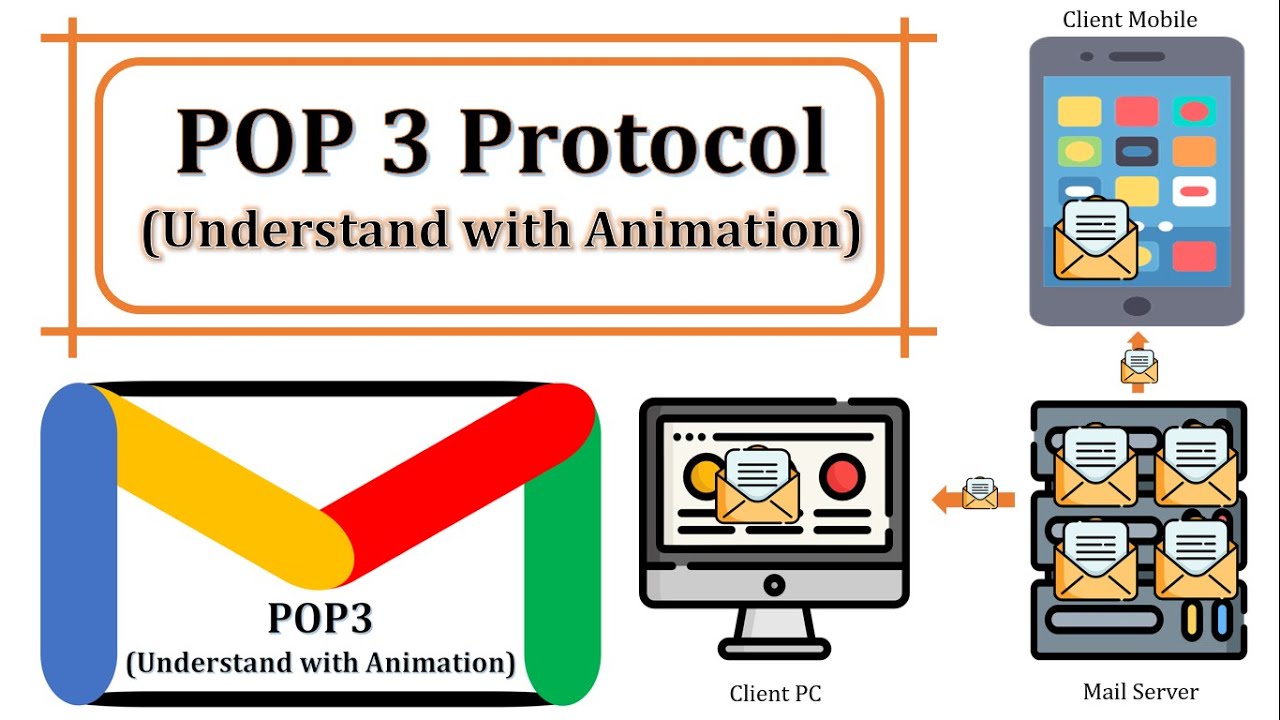

The pop protocol follows a download-and-delete method by default. When your email client connects to the pop protocol server (usually on port 110 or 995 for SSL), it authenticates with your username and password, retrieves new messages, downloads them, and removes them from the server. This ensures that all emails are stored on your local device.
Modern clients now allow users to “leave a copy on the server,” enabling multi-device access while maintaining protocol’s core simplicity. It remains a reliable system for users who want complete control over their stored emails, with detailed guides available on SFM Compile for optimizing email management.
Technical Functionality in Modern Systems
Despite newer alternatives, pop protocol still plays a key role in 2025. It’s particularly useful for:
- Local Archiving: Keeps a permanent, secure backup of emails.
- Bandwidth Efficiency: Perfect for areas with unstable or expensive internet connections.
- Privacy Control: Ensures sensitive data is stored offline, not on cloud servers.
Main Features of Pop Protocol and Its Differences
| Feature | Pop Protocol (POP3) | IMAP (Internet Message Access Protocol) | SMTP (Simple Mail Transfer Protocol) |
| Primary Function | Retrieve messages from server to local device. | Access and manage messages on the server. | Send messages from client to server (or server to server). |
| Message Storage | Local device (deleted from server by default). | Server (synchronized across all devices). | N/A (Sending protocol only). |
| Multi-Device Support | Poor/Limited. No sync; once downloaded, it’s gone from the server (unless configured otherwise). | Excellent. All folders/statuses sync in real-time. | N/A. |
| Offline Access | Full. You can read and compose replies offline. | Partial. Cached messages can be read; full functionality requires connection. | N/A. |
| Server Load | Low. Messages are quickly downloaded and often deleted. | Higher. Messages are kept on the server, and a constant connection is often maintained. | Low (for outgoing mail). |
POP vs IMAP: The Critical Distinction
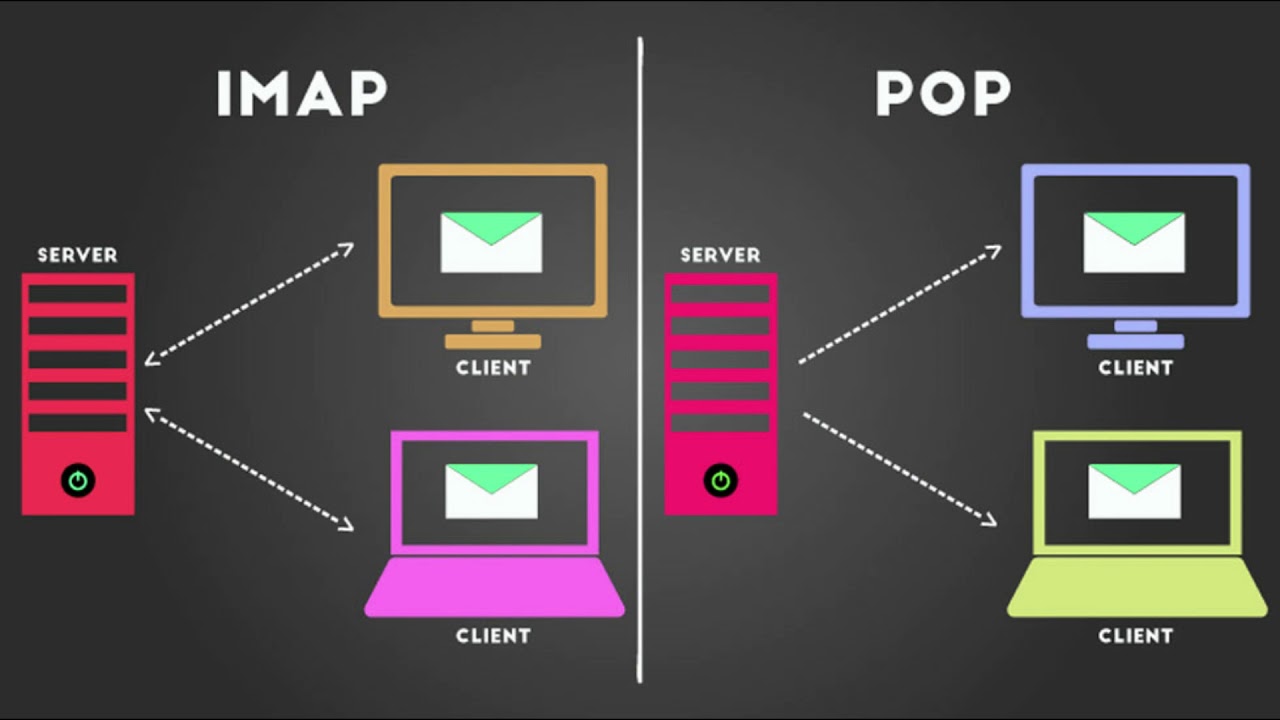
The main difference between IMAP and pop protocol lies in how they handle messages. IMAP syncs emails across devices, while pop protocol downloads and stores them locally. For users who prefer simple, single-device access, pop protocol remains a dependable choice.
POP vs SMTP: Inbound vs. Outbound
While pop protocol is used to receive messages, SMTP is used to send them. Both protocols often work together in email systems: pop protocol handles inbound mail, and SMTP manages outbound mail, a process that iZoneMedia360.com Empowers users to understand and optimize for seamless email communication.
Advantages and Disadvantages of Using Pop Protocol
✅ Advantages of Protocolo
- Simplicity: Easy setup and use make pop protocol ideal for beginners and small businesses.
- Offline Access: Once downloaded, emails are available even without an internet connection.
- Reduced Server Space: Ideal for servers with limited storage.
- Security: With encryption, pop protocol can safely store messages locally.
❌ Disadvantages and Limitations
- No Real-Time Sync: Changes made on one device don’t appear on others.
- Storage Dependency: Messages consume space on your local drive.
- Data Loss Risk: If your computer fails and backups aren’t made, emails can be lost.
- Limited Multi-Device Use: Pop protocol isn’t designed for users with multiple access points.
Which One Should You Use in 2025?
In 2025, IMAP will be the standard for most users due to its synchronization features. However, pop protocol still serves specific needs. If you prefer privacy, offline access, and complete local storage, pop is a perfect fit. For those working with legal or security-sensitive data, its simple structure offers unmatched control. Many enterprises still rely on pop protocol for compliance, archiving, and data management in restricted networks, as highlighted in tools like MyStuff 2.0 for efficient data organization.
Future of Pop Protocol in 2025 and Beyond

The pop protocol may no longer dominate modern email communication, but it’s far from obsolete. In fact, it’s finding new life in specialized applications like local data archiving, offline backups, and air-gapped systems. As IMAP and cloud APIs evolve, pop protocol continues to be used in environments where minimal connectivity and strong privacy are priorities.
Experts predict that protocol will remain a niche tool used by organizations valuing simplicity, backward compatibility, and control over their data. Its lightweight nature ensures that even in a world of smart devices, pop protocol continues to serve a valuable role.
Conclusion
The pop protocol is a cornerstone of email technology. While IMAP and cloud systems dominate, this classic protocol still offers a secure, simple, and efficient way to handle email. Its offline-first design ensures users always have access to their data, regardless of server status or internet speed. Whether you’re an IT professional or a privacy-focused user, understanding pop protocol is key to managing your digital communication efficiently.
For modern users, the choice is simple: IMAP for constant sync and convenience—or pop protocol for privacy, reliability, and full local control.
Read More Like This: PedroVazPaulo Coaching
FAQs
What is the main purpose of the POP protocol?
The main purpose of the POP protocol is to download emails from a mail server to a local device, allowing offline access and management of messages.
How does the POP protocol work?
When an email client connects to the POP server, it authenticates, retrieves new messages, downloads them to the device, and then deletes them from the server by default, ensuring local storage of emails.
What are the key differences between POP and IMAP?
POP downloads emails to a device and typically deletes them from the server, offering limited multi-device support, while IMAP syncs emails and folders across multiple devices with messages stored on the server.
What are the advantages of using POP protocol?
POP is simple to set up, supports offline email access, reduces server space usage, and can provide secure local storage of messages.
In what scenarios is POP protocol still useful in 2025?
POP remains useful for local archiving, working in environments with limited or unstable internet connectivity, and for users prioritizing privacy and full control over their emails.